Lua Editor
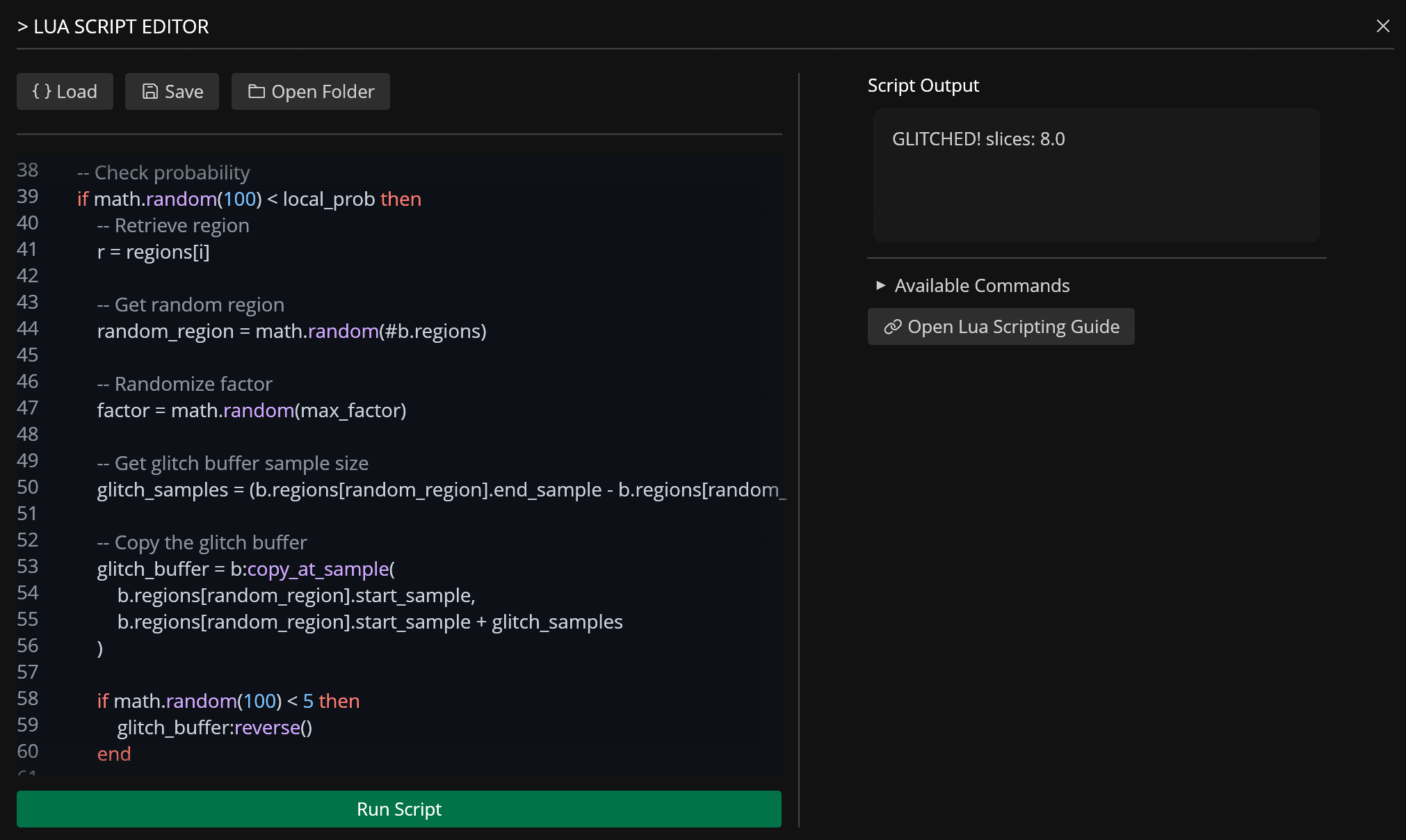
The Lua Editor lets users extend Recorte functionality through custom Lua scripts (Lua v5.4), that users can edit with the built-in editor or any text editor.
Lua is a lightweight, high-performance scripting language designed for embedded systems and extensibility, created and maintained by a dedicated team in PUC-Rio (Brazilian university) and used by many games and applications.
For more information about Lua, visit https://www.lua.org/.
Scripts are stored in the settings / scripts folder and can be run via the Lua Editor or custom keyboard shortcuts.
You can access and manipulate Files, Regions, Effects, and Actions from Lua through custom tables and functions that are available during runtime.
Scripting
action Table
Global functions that queue actions for the application to process.
| Name / Signature | Parameters | Functionality | Return Value |
|---|---|---|---|
action.open_path(path) |
path: string |
Queues opening of an audio file at the specified filesystem path. | void |
action.activate_file(index) |
index: number |
Switches the active file to the one at the given index (1-based). | void |
action.file_count() |
None | Returns the total number of loaded files. | number |
action.get_file(index) |
index: number |
Retrieves a File object at the specified index (1-based). |
File (userdata) |
action.update_file(index, file) |
index: number, file: File |
Replaces the file at the given index with a new File object (1-based). |
void |
action.get_active_file() |
None | Returns the currently active File object. |
File (userdata) |
action.update_active_file(file) |
file: File |
Replaces the active file with a new File object. |
void |
action.close_file(index) |
index: number |
Queues closing/removing a file at the given index (1-based). | void |
action.close_all_files() |
None | Queues closing all loaded files. | void |
action.select_next_file() |
None | Queues switching to the next file in the list. | void |
action.select_previous_file() |
None | Queues switching to the previous file in the list. | void |
action.zoom_all() |
None | Queues UI zoom to fit the entire waveform. | void |
action.zoom_selected_region() |
None | Queues UI zoom to the currently selected region. | void |
action.zoom_selection() |
None | Queues UI zoom to the current time selection. | void |
action.export_all_files() |
None | Queues export of all loaded files to disk. | void |
action.debug_table(table) |
table: table |
Debug utility: logs the contents of a Lua table to Recorte's console. | void |
action.available() |
None | Lists all available action function names. | string[] (table) |
active_file Table
Utilities for interacting with the currently active file.
| Name / Signature | Parameters | Functionality | Return Value |
|---|---|---|---|
active_file.get() |
None | Retrieves the currently active File object. |
File (userdata) |
active_file.update(file) |
file: File |
Replaces the active file with a new File object. |
void |
active_file.update_buffer(buffer) |
buffer: AudioBuffer |
Replaces the audio buffer of the active file. | void |
active_file.select_regions(indices) |
indices: table<number> |
Selects multiple regions for the active file (1-based). | void |
active_file.selected_regions() |
None | Returns the currently selected region indices (1-based). | table<number> |
active_file.play() |
None | Queues playback of the active buffer/region. | void |
active_file.close() |
None | Queues closing the currently active file. | void |
active_file.new_files_from_regions() |
None | Queues creation of new files from all existing regions. | void |
active_file.export() |
None | Queues export of the currently active file. | void |
active_file.export_region(index) |
index: number (1-based) |
Queues export of the region at the given index of the active file. | void |
active_file.export_selected_regions() |
None | Queues export of only selected regions. | void |
active_file.export_all_regions() |
None | Queues export of all regions as separate audio files. | void |
active_file.load_effect_preset(path) |
path: string |
Loads an effect preset into the active file. | void |
active_file.available() |
None | Lists available file utility function names. | string[] (table) |
Other Globals
| Name / Signature | Parameters | Functionality | Return Value |
|---|---|---|---|
info.file_count |
Property | Contains the total number of loaded files. | number |
check_equal(list1, list2) |
list1: string[], list2: string[] |
Utility/debug: adds lengths of two string arrays. | number |
AudioBuffer Object
Represents the raw audio data, metadata, and processing methods.
| Name / Signature | Parameters | Functionality | Return Value |
|---|---|---|---|
sample_count |
Field (Read) | Total number of audio samples in the buffer. | number |
bpm |
Field (Read) | Tempo metadata for the buffer. | number |
samples |
Field (Get/Set) | Raw sample data (multi-channel array). | table |
sample_rate |
Field (Read) | Sample rate in Hz. | number |
bit_depth |
Field (Read) | Audio bit depth (e.g., 16, 24, 32). | number |
bars |
Field (Get/Set) | Number of musical bars in the buffer. | number |
grid_size |
Field (Get/Set) | UI grid snapping size. | number |
name |
Field (Get/Set) | Display name of the buffer. | string |
regions |
Field (Get/Set) | Array of Region objects. |
table |
effects |
Field (Get/Set) | Serialized global effects applied to the buffer. | table (serialized) |
size_kb() |
None | Calculates memory size of the buffer. | number (KB) |
is_mono() |
None | Checks if buffer has 1 channel. | boolean |
is_stereo() |
None | Checks if buffer has 2 channels. | boolean |
length_ms() |
None | Calculates duration in milliseconds. | number |
channel_diff() |
None | Computes difference between channels. | table |
restore() |
None | Reverts buffer to its original reference samples. | void |
resample(new_rate) |
new_rate: number |
Resamples audio to a new sample rate. | void |
add_region(start, end) |
start: number, end: number |
Adds a region at sample positions. | void |
remove_region(index) |
index: number (1-based) |
Removes a region by index. | void |
region_count() |
None | Returns number of regions. | number |
get_region_info(index) |
index: number (1-based) |
Returns metadata for a region. | RegionInfo |
remove_all_regions() |
None | Clears all regions. | void |
detect_regions(threshold, min_length_ms) |
threshold: number, min_length_ms: number |
Auto-detects regions based on loudness threshold and minimum length. | table<Region> |
detect_transients(threshold) |
threshold: number |
Marks transient points for snapping. | void |
get_region(index) |
index: number (1-based) |
Returns a Region object. |
Region |
join_all_regions(sep_ms) |
sep_ms: number |
Concatenates all regions with separation silence. | AudioBuffer |
auto_trim_region(idx, thresh) |
idx: number, thresh: number |
Shrinks region edges below threshold. | void |
zero_cross_region(index) |
index: number (1-based) |
Snaps region edges to zero-crossings. | void |
zero_cross_transients() |
None | Snaps transient markers to zero-crossings. | void |
slice(slices) |
slices: number |
Divides entire buffer into N equal regions. | void |
slice_region(idx, slices) |
idx: number, slices: number |
Divides a specific region into N equal parts. | void |
copy_at_sample(start, end) |
start: number, end: number |
Copies samples to a new buffer. | AudioBuffer |
copy_at_position(start, end) |
start: 0.0-1.0, end: 0.0-1.0 |
Copies proportional section to new buffer. | AudioBuffer |
cut_at_sample(start, end) |
start: number, end: number |
Cuts samples, returns cut section. | AudioBuffer |
cut_at_position(start, end) |
start: 0.0-1.0, end: 0.0-1.0 |
Cuts proportional section, returns cut. | AudioBuffer |
paste_at_sample(buf, idx, repl) |
buf: AudioBuffer, idx: number, repl: boolean |
Pastes buffer at sample index (insert/replace). | void |
paste_at_position(buf, pos, repl) |
buf: AudioBuffer, pos: 0.0-1.0, repl: boolean |
Pastes buffer at proportional position. | void |
mix_at_sample(buf, pos, mix) |
buf: AudioBuffer, pos: number, mix: number |
Mixes buffer into target at sample position. | void |
mix_at_position(buf, pos, mix) |
buf: AudioBuffer, pos: 0.0-1.0, mix: number |
Mixes buffer at proportional position. | void |
update_region(idx, region) |
idx: number, region: Region |
Overwrites an existing region. | void |
export_region(index) |
index: number (1-based) |
Exports region as a new independent buffer. | AudioBuffer |
normalize(value) |
value: number |
Applies normalization. | void |
fade_in(duration) |
duration: number |
Applies fade-in envelope. | void |
fade_out(duration) |
duration: number |
Applies fade-out envelope. | void |
gain(value) |
value: number |
Applies gain adjustment (linear). | void |
rate(value) |
value: number (multiplier) |
Changes playback rate/time-stretch. | void |
reverse() |
None | Reverses audio samples. | void |
pitch(amount) |
amount: number (semitones) |
Pitch-shifts audio. | void |
pitch_shift(amount) |
amount: number (semitones) |
Pitch-shifts audio with formant preservation. | void |
size() |
None | Returns the formatted size of the buffer as a string. | string |
channel() |
None | Returns the number of channels. | number |
remove_channel(index) |
index: number (1-based) |
Removes a channel by index. | void |
trim_to_regions(indices) |
indices: table<number> (1-based) |
Trims the buffer to the specified regions. | void |
- Methods ending in
_at_positionaccept0.0(start) to1.0(end). Values are automatically clamped.
Region Object
Represents a defined slice/segment of an audio buffer.
| Name / Signature | Parameters | Functionality | Return Value |
|---|---|---|---|
name |
Field (Get/Set) | Display name of the region. | string |
start_sample |
Field (Get/Set) | Start position in samples. | number |
end_sample |
Field (Get/Set) | End position in samples. | number |
length |
Field (Read) | Calculated sample length (end - start). |
number |
pitch_str |
Field (Read) | String representation of the region's pitch. | string |
bpm |
Field (Get/Set) | Tempo metadata specific to the region. | number |
RegionInfo Object
Read-only metadata returned by AudioBuffer:get_region_info().
| Name / Signature | Parameters | Functionality | Return Value |
|---|---|---|---|
index |
Field (Read) | Zero-based index of the region. | number |
name |
Field (Read) | Region name. | string |
start_sample |
Field (Read) | Absolute start in samples. | number |
end_sample |
Field (Read) | Absolute end in samples. | number |
start_rel |
Field (Read) | Relative start position (0.0-1.0). | number |
end_rel |
Field (Read) | Relative end position (0.0-1.0). | number |
length_ms |
Field (Read) | Duration in milliseconds. | number |
File Object
Represents a loaded audio file in the workspace.
| Name / Signature | Parameters | Functionality | Return Value |
|---|---|---|---|
path |
Field (Get/Set) | Filesystem path of the loaded file. | string |
buffer |
Field (Get/Set) | The underlying AudioBuffer object. |
AudioBuffer |
Effect Object
Internal effect representation (typically handled through the effects field).
| Name / Signature | Parameters | Functionality | Return Value |
|---|---|---|---|
name |
Field (Read) | Auto-formatted string name of the effect. | string |
Important Scripting Notes
-
1-Based Indexing: All Lua functions referencing
indexfor regions or files use 1-based indexing. Passing0throws a runtime error in most methods;action.close_file(0)andactive_file.export_region(0)treat0as1. Out-of-range indices on queued actions are silently ignored. Methods returningRegionInfo(likeAudioBuffer:get_region_info()) use 0-based indexing for theindexfield. -
Asynchronous Actions: All
action.*functions do not execute immediately. They push commands to an internal action queue that the UI/app processes on the next tick. -
In-Place vs Copy: Methods like
normalize,fade_in,pitch, andslicemodify theAudioBufferin-place and returnvoid. Methods likecopy_at_...,cut_at_..., andjoin_all_regionsreturn newAudioBufferinstances without altering the source. -
Serialization: The
effectsfield expects/returns a Lua table that serializes to JSON matching the RustEffectstructure. -
Object Copying: When you retrieve an
AudioBufferorFileobject (for example,action.get_active_file()), you get a clone/snapshot. Modifications to this Lua object do not affect the application state. You must use anupdate_function to apply changes (for example,action.update_active_file()oractive_file.update_buffer()). -
EffectCreation: To set theeffectsfield, provide a Lua table of effect slots matching the RustEffectSlotstructure: each slot has astatusboolean and aneffectentry keyed by theEffectvariant name (externally tagged). Examples:
b.effects = {
    { status = true, effect = { Gain = -6.0 } },
    { status = true, effect = { Normalize = 0.9 } },
    { status = true, effect = { PitchShift = { window = 50, amount = 2.0, oversampling = 16 } } },
}